DropCopy

Drag a file onto anyone - across the room or across the world. Free local transfers between your Apple devices, plus Secure Remote Send with end-to-end encryption for sending files to anyone, anywhere. No account needed on the receiving end.

Download DropCopy on the App Store

DropCopy shape shape
New

Secure Remote Send - send files to anyone, anywhere

Secure Remote Send lets you send a file to anyone, not just devices on your Wi-Fi. The recipient just opens a link in their browser. No DropCopy install, no account, nothing to set up on their end.

Your file is encrypted on your Mac before it leaves. The decryption key travels only in the URL fragment (the part after #), which browsers never send to any server. That means the relay that carries the bytes cannot read them, and neither can we. Your data stays private, end to end.

Links expire after 30 minutes for added security. Your first 5 remote transfers are free, then it is just $0.99/month. Local transfers between your own devices remain free and unlimited, as they have always been.

Local File Transfer

Instant, free file sharing between all your Apple devices

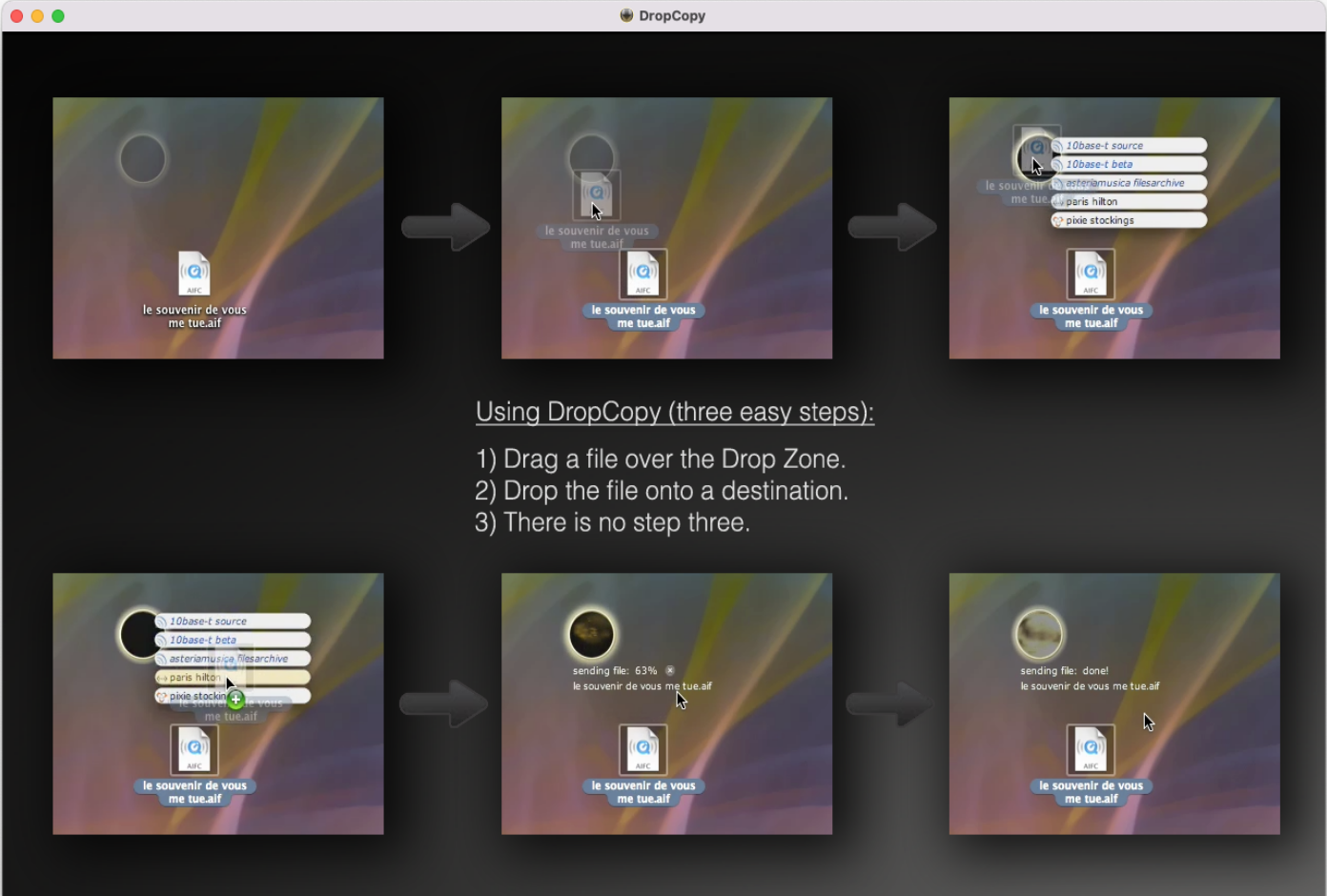
Launch DropCopy on two or more devices on the same Wi-Fi network and they discover each other automatically via Bonjour. Select a file, pick a destination, done. On macOS, just drag a file onto DropCopy’s discreet desktop dropzone and it transfers immediately.

DropCopy also supports clipboard sharing between devices, short messages, file previews for common formats (Word, PDF and many others), and a recent-transfers history. It works reliably when AirDrop does not, and supports current and legacy Mac hardware alike.

Available on macOS (Mac App Store and direct download), iOS and iPadOS. Apple Vision Pro support coming soon.

Download DropCopy on the App Store

Reviews

DropCopy

“It’s running on every computer in my house and office— it’s become one of the first things I install on any new Mac."

Dan Frakes

Macworld - Mac Gems

Simple, Reliable, Amazing.

"Recently, when I was unable to connect other Macs to one running Big Sur... I found and downloaded DropCopy, and it worked beautifully!"

App Store Review

Easy!

"Super easy way to share large or small files, photos, iMovies, documents between all of our family laptops and iPads. "

App Store Review

Reliable and Consistant.

"A CONSTANT on every Mac I own. It works to move files, it does it well, and with no problems. This works when AirDrop does not. I cannot recommend it enough. If you need to move files between Macs, this is for you."

App Store Review

DropCopy goes where AirDrop cannot

"I can’t use [AirDrop] for iPhone to computer because my MBP is too old… Since I am often transferring what I consider sensitive information, I don’t want to use a cloud service… DropCopy solved both problems for me… Mega Thanks!"

App Store Review

First is Best

"DropCopy just works - with multiple devices on the wifi network the ‘drag & drop’ is easy, convenient and I find this more reliable than AirDrop."

App Store Review

Best local network file transfer app

"Easier to use than AirDrop... It also sends short messages and your clipboard, so you have your own instant messaging network at home... Best app out there for local file transfers and messaging."

App Store Review

DropCopy for macOS

DropCopy for macOS

Free local file sharing plus Secure Remote Send with end-to-end encryption
Mac App Store | Direct Download

Download DropCopy on the Mac App Store

DropCopy for iOS and iPadOS

DropCopy for iOS

Share files between iPhone, iPad and Mac - locally or remotely with encryption
Download Now

Download DropCopy on the iOS App Store

Direct downloads and an archive of older versions for legacy hardware are available here

FAQ

Frequently Asked Questions

Is DropCopy an AirDrop alternative?

Yes. DropCopy transfers files between Mac, iPhone and iPad over your local Wi-Fi network, and it works reliably on hardware and OS versions where AirDrop does not. It also adds features AirDrop lacks, like clipboard sharing, file previews and short messages.

What is Secure Remote Send?

Secure Remote Send lets you send a file to anyone, anywhere. The recipient just opens a link in their browser - no DropCopy install, no account, nothing to set up. Files are encrypted on your device before upload, and the decryption key travels only in the URL fragment, which browsers never send to any server. Links expire after 30 minutes for added security.

How much does DropCopy cost?

Local file transfers between your own devices are free and unlimited, as they have always been. Secure Remote Send includes 5 free transfers, then costs $0.99 per month.

How do I transfer files between a Mac and an iPhone?

Install DropCopy on both devices and make sure they are on the same Wi-Fi network. The devices discover each other automatically via Bonjour. Select a file and pick the destination, or on macOS drag a file onto DropCopy's desktop dropzone. The transfer is instant and stays on your local network.

CONTACT US:
Looking for support? Try our FAQs first.